Upsenso
A point of sale that keeps selling when the internet doesn’t.
Point of sale, inventory and back office for Philippine shops, cafés and restaurants. Every sale is written to an encrypted database on the device first and queued for sync, so the counter never waits on the network.
- Sole developer
- Independent product
- Feb 2026 – present
- Android (tablet and phone) · Web
- Flutter, Dart, Bloc, Drift + SQLCipher, Supabase, Postgres, Edge Functions, llama.cpp
- Pre-launch · in active development
- Private repository
Introduction
Upsenso is a point of sale, inventory and back office for small Philippine businesses: shops, cafés and restaurants, from a single counter to a few branches. I’ve been building it on my own since February 2026. It runs on Android tablets and phones, with a web version at app.upsenso.com (opens in a new tab).
It hasn’t launched. Android builds go out through Google Play testing tracks while I get the backend ready for real businesses. So this isn’t a story about users or revenue. It’s about the part of a point of sale that a demo never shows: what happens to a sale when the internet drops in the middle of a busy afternoon.
Problem and motivation
In the places Upsenso is for, the connection is the least reliable part of the counter. Mobile data runs out, the signal drops, and a power interruption restarts the router. A point of sale that needs the network to finish a sale fails exactly when the shop is busiest, and a cashier can’t ask a queue to wait for a signal.
So I started from one requirement: the counter never waits on the network. A sale has to complete on the device, correctly, every time, and reach the server later without being lost or counted twice.
Queuing requests and retrying them is the easy part. The work is in the cases a demo never hits:
- a crash between saving a sale and deducting its stock;
- a refund that reaches the server before the sale it refunds;
- a request that times out on the phone after the server has already applied it;
- two devices editing the same product while one of them is offline.
Each of those lets the books drift away from reality without anyone noticing, which for a business is worse than an error message.
Users and context
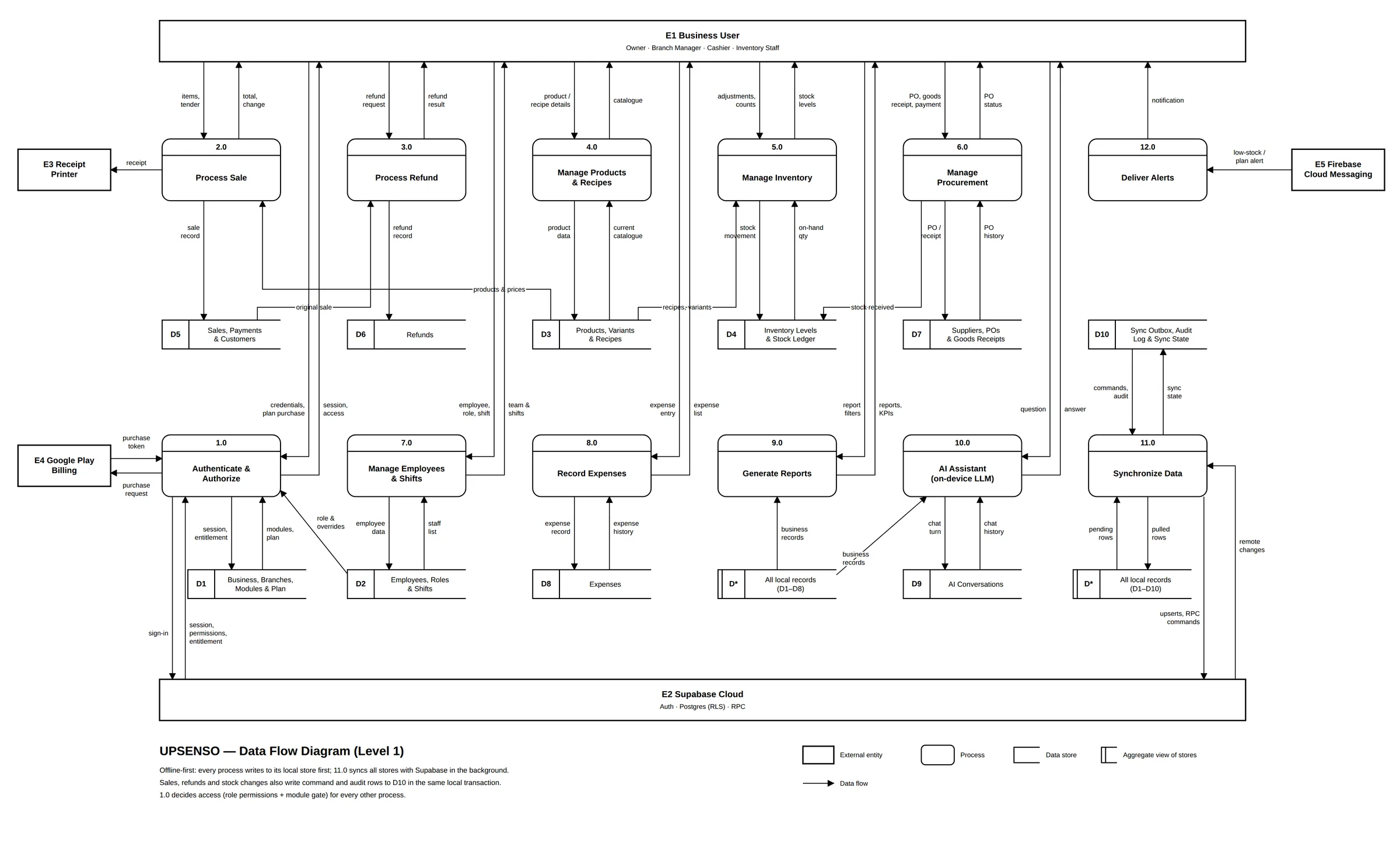
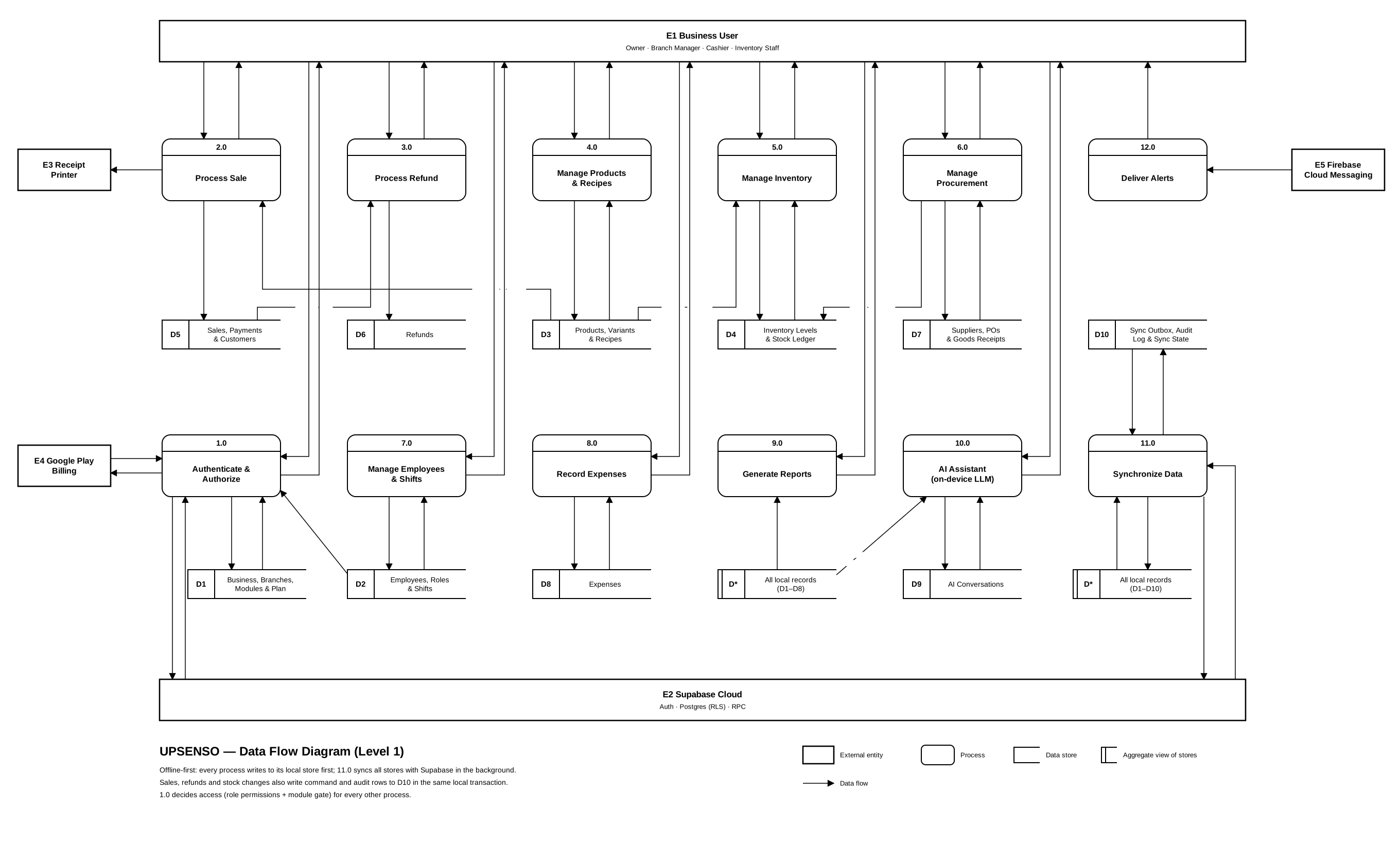
Upsenso is for owners and the people who work for them. Its data-flow diagram names four kinds of user: owner, branch manager, cashier and inventory staff. They share mid-range Android tablets and phones at the counter, and owners check reports from wherever they are.
That shapes the requirements as much as the network does:
- Permissions by default. A cashier shouldn’t see the owner’s reports or approve their own refund. Access has two layers: module switches for what a business uses, and a deny-by-default permission matrix with 4 roles and 104 permissions.
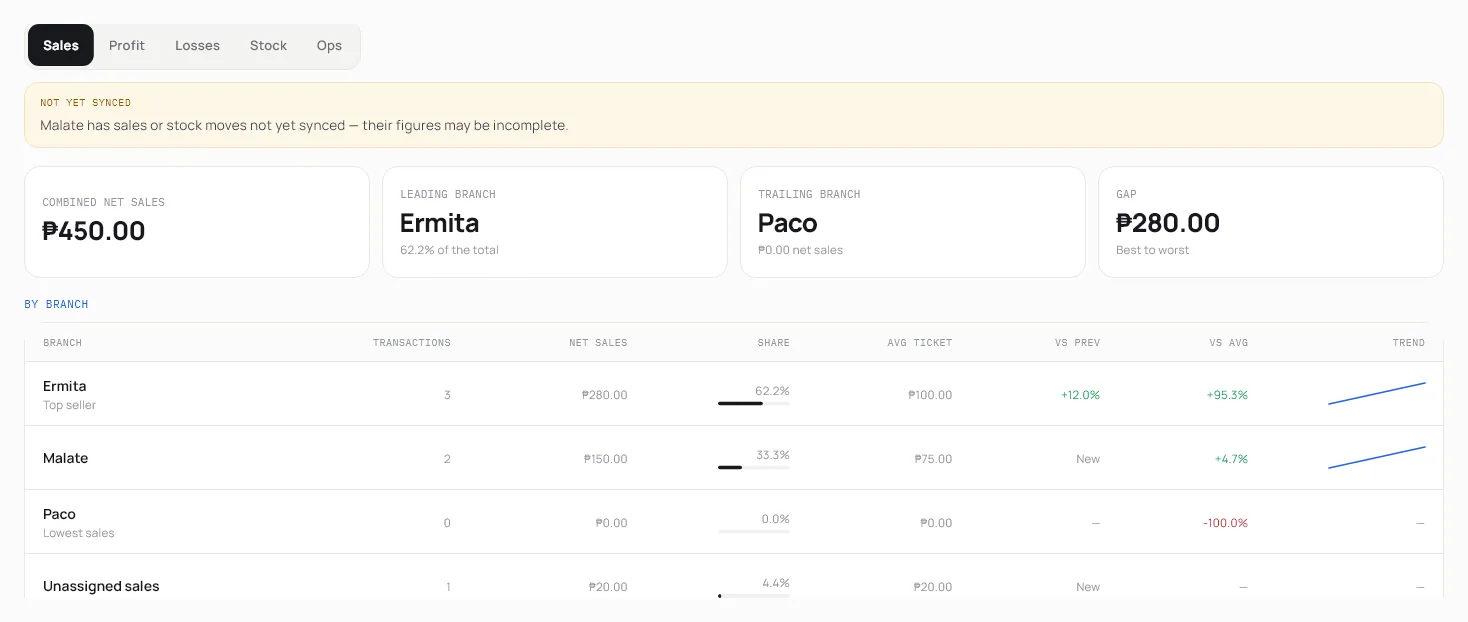
- Branches from the start, because a second branch is how a small business grows, and a report has to say when a branch hasn’t synced yet.
- Money and time done carefully. Amounts are stored as whole centavos, never floating point. Business days come from a business clock, so they don’t change with the time zone of the phone or the server.
Role and contributions
I’m the only developer: product decisions, interface design, the Flutter app, the database on both sides, the Supabase backend, CI and releases.
I build with AI coding assistants, mainly Claude Code and Codex, as pair programmers. I own the architecture and the trade-offs, review what they produce, and pin behaviour down with tests. The decisions on this page, including the ones I got wrong first, are mine.
Technologies
- Flutter and Dart · Bloc / Cubit, get_it, go_router
- Drift over SQLite, encrypted with SQLCipher · 83 tables
- Supabase · Postgres with row-level security on every table · 92 migrations · 10 Edge Functions
- flutter_test with golden screenshots · pgTAP for the database
- Rules, then an on-device model through llama.cpp, then a cloud model behind an Edge Function
- Google Play Billing, verified and reconciled by Edge Functions
- GitHub Actions · Google Play testing tracks · Firebase Cloud Messaging for alerts
System architecture
Everything the app does writes to its local database first. Sync runs in the background, in two directions that work differently on purpose.
Flutter app
Bloc / Cubit · get_it · go_router
Services
one local transaction per action
Encrypted database
Drift + SQLCipher · 83 tables
Outbox
commands waiting to upload
On the device to Supabase: commands, up to 25 per request
Supabase to On the device: changes, paged by (timestamp, id)
Command functions
complete_sale, create_refund, …
Receipts
one row per command id
Postgres
RLS on every table · 92 migrations
Edge Functions
AI proxy, billing, push · 10 in all
Writes go up as commands. Anything that moves money or stock (a sale, a refund, an expense review) is saved locally and, in the same transaction, queued as a command in an outbox table. The server never receives “here is my new row”. It receives “complete this sale, command id X”, and runs a Postgres function that checks permissions, stock and totals again before applying it.
Changes come down as deltas. Each table is pulled in pages ordered by (timestamp, id), and a watermark for that table only moves forward after a page is fully applied. Rows that share a timestamp can’t be skipped at a page boundary, and a crash mid-pull resumes from the last good page, because applying a row twice changes nothing.
Key implementations
A sale is one transaction
Recording a sale and moving its stock used to be two separate steps in the checkout screens. A crash between them left a sale with no stock deduction, or the other way round. Now one service owns the whole sale, inside one local database transaction:
await _db.transaction(() async {
  // Validate stock inside the transaction so an oversell aborts the whole
  // sale rather than relying on adjustQuantity's silent clamp-to-zero,
  // which would record the sale while quietly under-deducting the ledger.
  shortages = await _inventoryRepository.checkStockAvailability(
    items: deductions,
    branchId: branchId,
  );
  if (shortages.isNotEmpty && !allowOversell) {
    throw InsufficientStockException(shortages);
  }

  await _transactionsDao.insertTransaction(txWithInvoice, items, addonLines);
  await _inventoryRepository.recordSaleDeductions(
    items: deductions,
    addonDeductions: addonDeductions,
    businessId: businessId,
    branchId: branchId,
    sourceId: transactionId,
    allowNegativeStock: allowOversell,
  );
  // … payments and payment events

  await _db.into(_db.financialCommandOutboxTable).insert(
    FinancialCommandOutboxTableCompanion.insert(
      id: effectiveCommandId,
      commandType: 'complete_sale',
      payloadJson: payloadJson,
      payloadHash: commandPayloadHash,
      // … business, branch, actor, device, timestamps
    ),
  );
  await _auditLogService.enqueueInTransaction(
    actionType: AuditLogActionType.saleCreated,
    // …
  );
});
The sale, its stock movement, its payments, the outbox command and the audit entry commit together or not at all. The audit entry is written here rather than by the screens because screen-side logging had already missed two of the three ways a sale can be created.
The outbox adapts to the server
Commands go up in batches, and the batch size has a reason. A command costs about 35–55 ms on the server, up to about 280 ms, and the database role has an 8-second statement timeout, so 25 per request stays well inside it. If a batch times out anyway, nothing in it was applied, so it’s split in half and retried:
static const int maxBatchSize = 25;

} on FinancialCommandGatewayException catch (e) {
  if (e.code == '57014' && chunk.length > 1) {
    // Nothing in a timed-out request was applied; retry it smaller.
    final half = max(1, chunk.length ~/ 2);
    _batchSize = half;
    _successesSinceShrink = 0;
    return await _sendClaimedBatch(gateway, chunk.sublist(0, half)) &&
        await _sendClaimedBatch(gateway, chunk.sublist(half));
  }
  // A whole-request failure says nothing about any one command, so none
  // is blocked for it — each just waits for its next retry.
  for (final command in chunk) {
    await _markRetry(command, e.code);
  }
  return false;
}

// Grow back toward the configured size only after a run of successes,
// so a size that just timed out isn't retried straight away.
if (_batchSize < _configuredBatchSize && ++_successesSinceShrink >= 5) {
  _batchSize = min(_configuredBatchSize, _batchSize * 2);
  _successesSinceShrink = 0;
}
Order matters as much as size. A refund that arrives before its sale is rejected for good, so the outbox knows each command’s parent: a refund waits until its sale is on the server, or rides in the same batch right behind it. Commands that fail wait for their next attempt with exponential backoff and jitter.
Replays are harmless
Retries mean the server will sometimes see the same command twice, for example when a request times out on the phone after the server has already committed it. Each financial function on the server starts the same way:
PERFORM pg_advisory_xact_lock(hashtextextended('financial-command:' || p_command_id::text, 0));
SELECT result_json INTO v_result FROM public.financial_command_receipts
 WHERE command_id = p_command_id AND business_id = v_business;
IF FOUND THEN RETURN v_result; END IF;

-- … validate the payload, check stock and totals, apply the sale …

INSERT INTO public.financial_command_receipts (command_id, business_id, actor_id, command_type, payload_hash, result_json)
VALUES (p_command_id, v_business, v_cashier, 'complete_sale', encode(extensions.digest(p_payload::text, 'sha256'), 'hex'), v_result);
RETURN v_result;
The advisory lock stops two copies of one command from racing, and the receipt makes the second copy return the first one’s answer. The phone can retry as often as it needs to.
Challenges
A bug that only appeared on a UTC machine
Reports and day boundaries go through a business clock, so “today” means today for the shop. Some code read a calendar field straight off a timestamp without converting it through that clock first. On a machine set to Philippine time that makes no difference, so every test passed. Anywhere else it does.
The fix came with a guard: CI now runs the whole suite a second time on a runner left in UTC, and a release can’t ship unless both runs pass. That second run moved to Linux after running the suite twice on Windows for every push hit the account’s GitHub Actions spending limit.
A production database nobody could rebuild
Three storage buckets and eleven storage policies had been created by hand in the dashboard. A database built from the migrations alone wouldn’t have matched production, and nothing said so. They’re migrations now, so production can be rebuilt from the repository.
Turning on a test gate that fails
When the pgTAP database tests first ran in CI, sixteen files failed. Waiting for all of them to pass would have kept the gate off indefinitely, so I quarantined those sixteen, turned the gate on for everything else, and I’m repairing them and bringing them back in batches.
Decisions and trade-offs
Commands for money, rows for everything else
- Server-side command functions with receipts for sales, refunds and expenses.
- Syncing every table as rows with last-write-wins.
- The server has to re-check money and stock, and a replayed sale must never count twice.
- Each financial action needs its own Postgres function and payload contract, kept in step with the app.
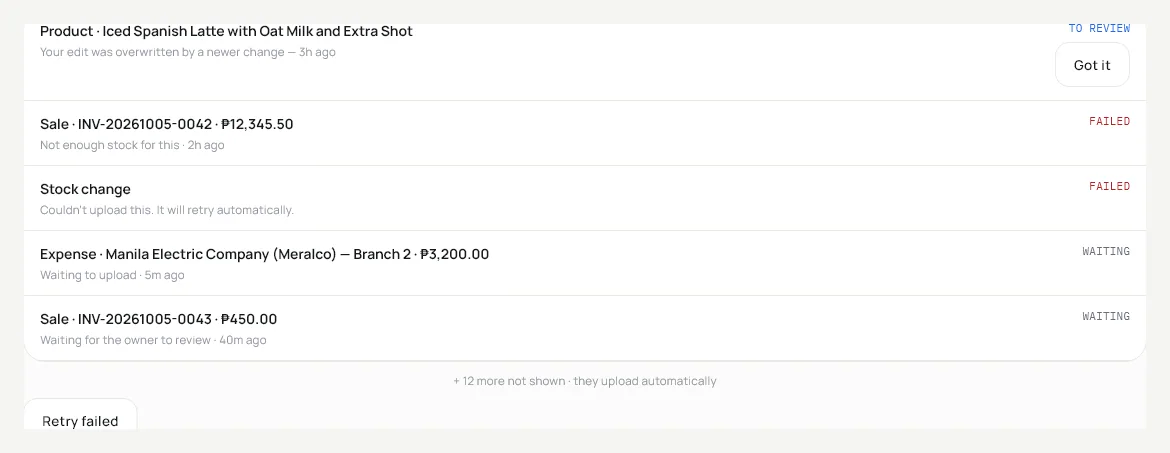
Ordinary records such as products and customers do sync as rows, with version-based last-write-wins. When a local edit loses to a newer one, it isn’t dropped silently: it’s logged and shown in the sync queue for review.
A hash chain, not a blockchain
- An audit log on each device where every entry stores the hash of the one before it.
- A blockchain or an external ledger service.
- The goal is to make edited history visible, not to remove the need to trust the server.
- It detects tampering after the fact; it can’t prevent it. The hashing also has to be byte-identical on every platform, so timestamps are cut to whole seconds and keys are sorted before hashing.
The AI never sees business rows
- Three rungs: rules first, then an on-device model through llama.cpp, then a cloud model behind an Edge Function.
- Sending the question and the shop’s data to a cloud model.
- Every rung only turns the question into an intent. Code picks the tool from that intent, and code writes the answer, so no model reads the shop’s records.
- The assistant can only answer what its tools cover, 52 of them, rather than anything at all.
Results and validation
Upsenso hasn’t launched, so there are no users, sales or uptime figures to report, and I won’t estimate any. What exists is the testing around it.
- test files in the Flutter app
- 777
- golden screenshots of real screens
- 539
- pgTAP database test files, now gating releases
- 42
- The suite runs twice in CI, in Philippine time and in UTC, and both runs gate releases.
- Every screen image on this page is a golden-test render with demo data.
- The 92 migrations rebuild the whole database from nothing, and since 12 November production matches them.
Not measured yet: how sync behaves on real shop networks over weeks, battery and storage use over months, and whether owners find it easy to run day to day. Those need real shops, which is what launch is for.
Lessons learned
- Offline-first is mostly about failure ordering. The happy path was the small part. Most of the work went into deciding what happens when one step of five fails, and in which order things are allowed to arrive.
- Write the reason next to the number. The batch size of 25 has its cost model in a comment beside it, so whoever changes it next, usually me months later, knows what it depends on.
- Make the database reproducible before you need to. Hand-made storage policies were invisible until I tried to rebuild production from the repository.
- A gate that starts partly closed beats one that never opens. Quarantining failing tests felt wrong, but it put every other database test in front of releases.
Screenshots and demonstrations
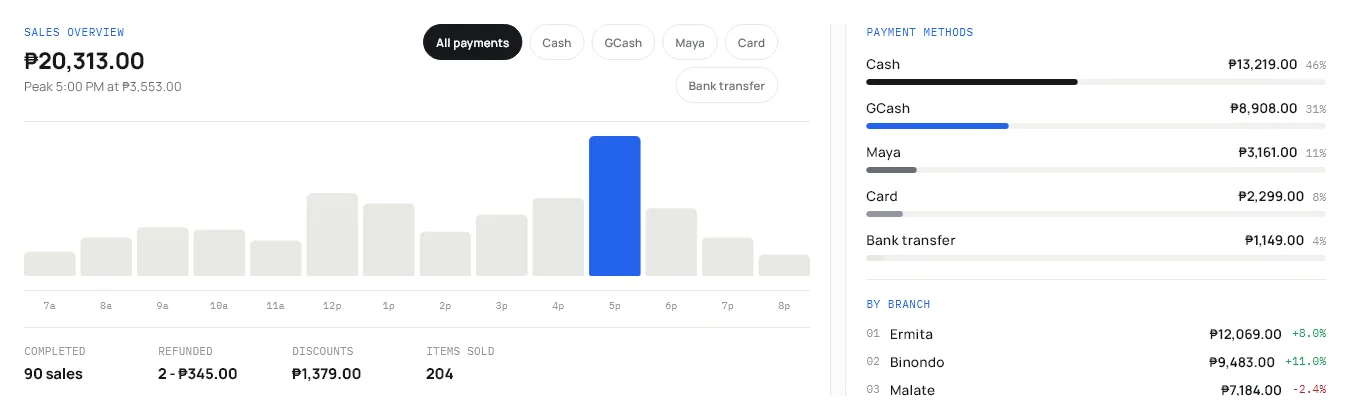
These are real Upsenso screens, rendered by the app’s own golden tests with demo data. The names and amounts are made up; the interface isn’t.
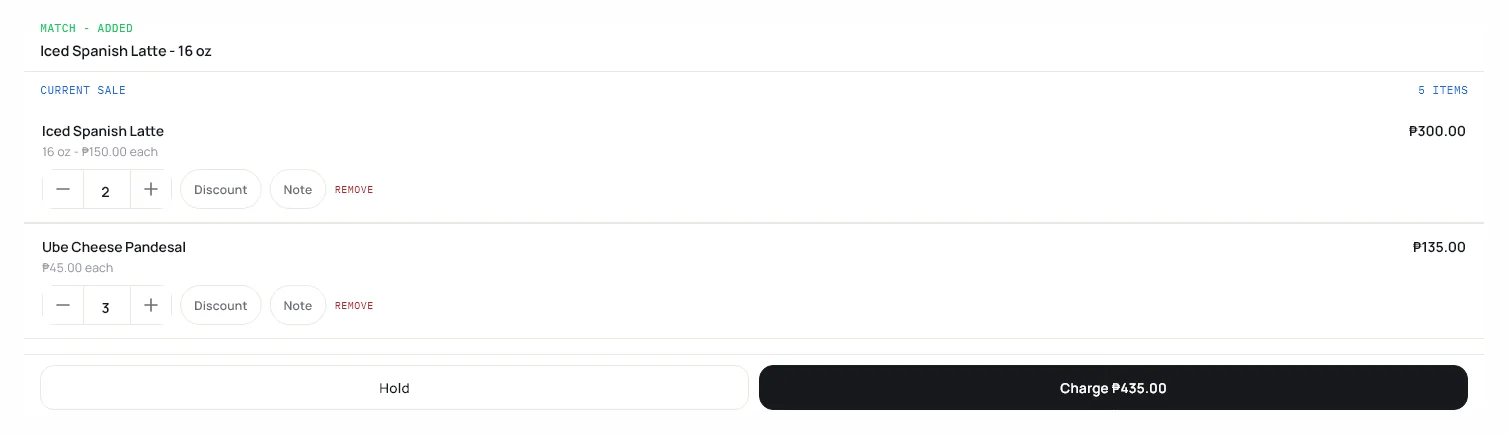
Checkout after a barcode scan, with the match confirmed above the cart. The sync queue: conflicts flagged for review, failures with reasons, and a retry. 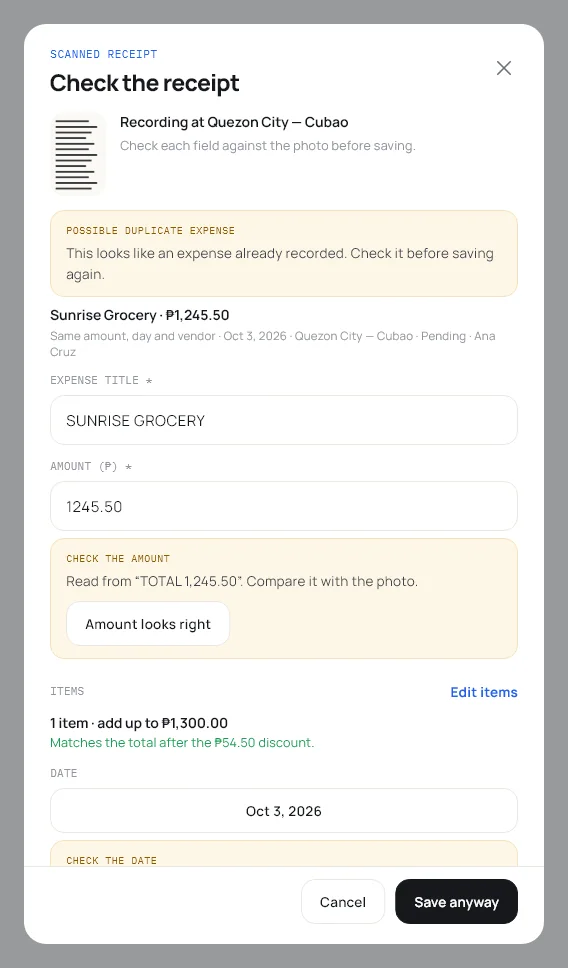
A scanned receipt, flagged as a possible duplicate. 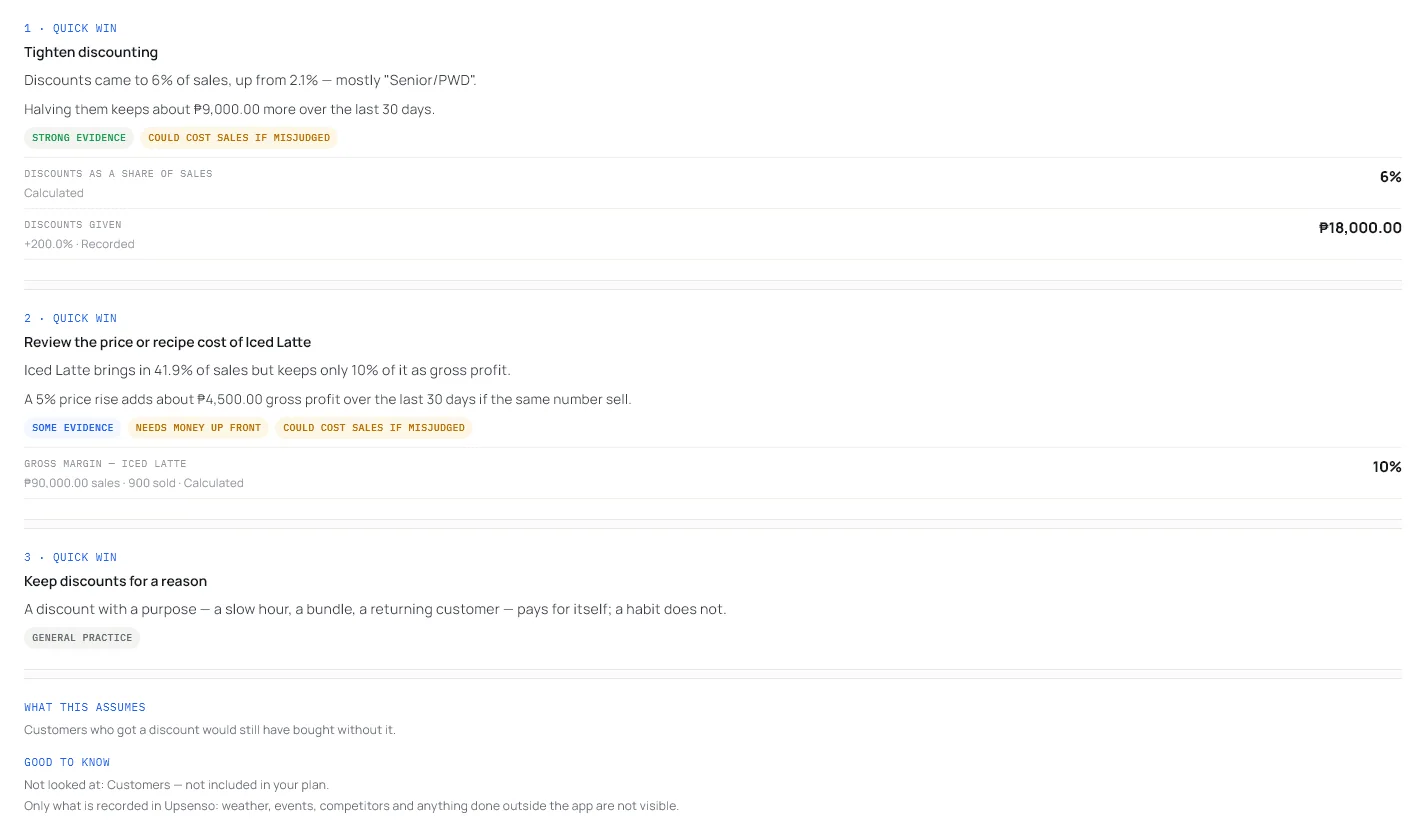
AI advice that says how strong its evidence is and what it didn’t look at. 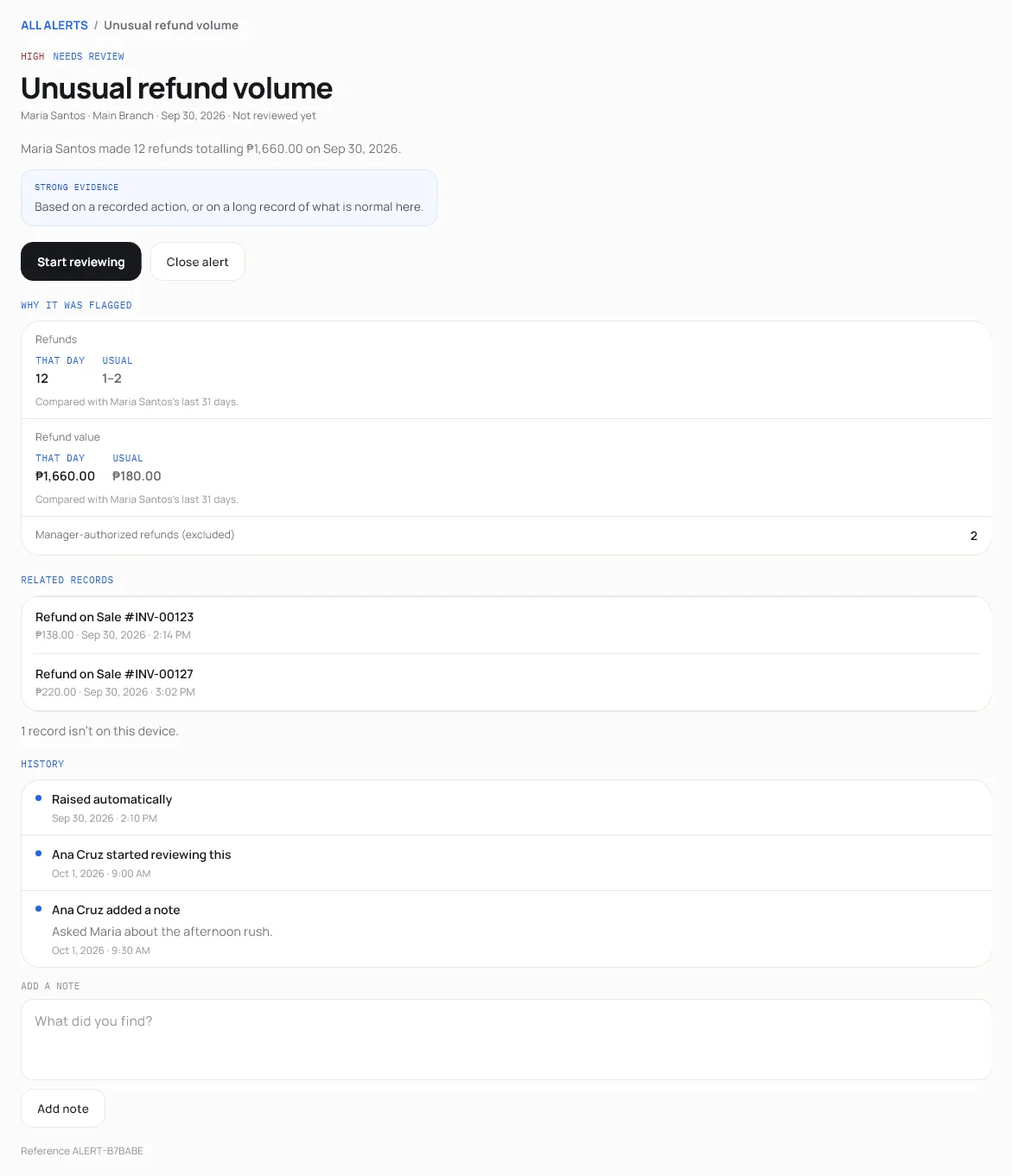
An unusual-activity alert, with the evidence and a review trail.